

Cartridge
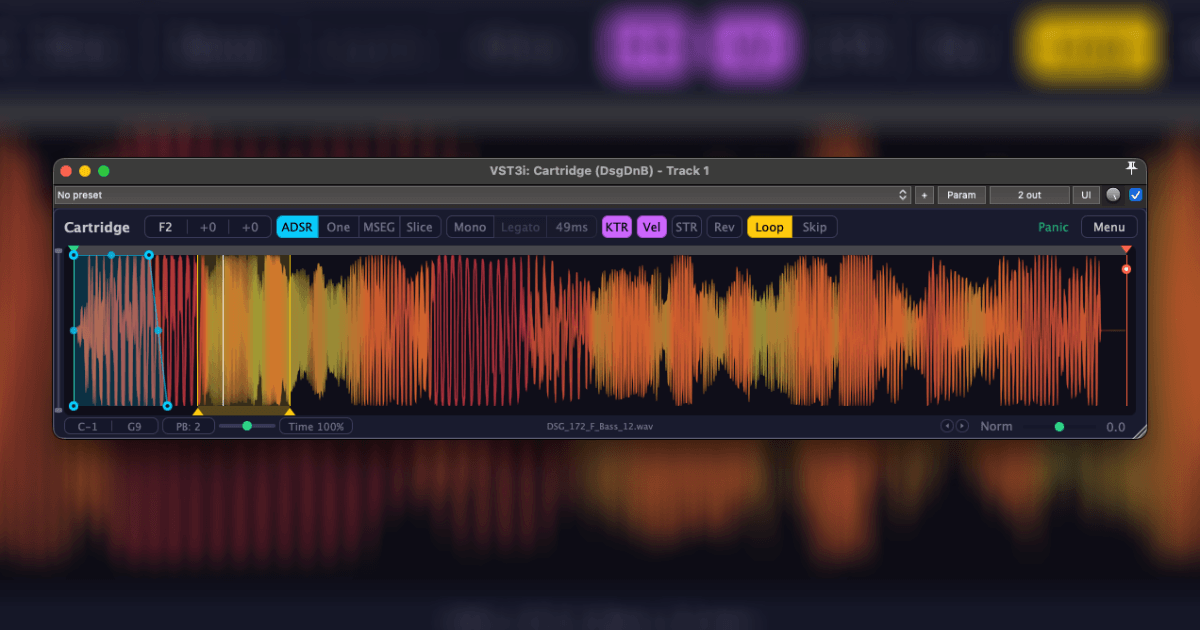

A versatile sampler/slicer built around four playback modes — from quick one-shots to fully sliced loops with MIDI export. Time-stretching, realtime looping, drawable modulation curves, and a multimode filter. Works in any modern DAW, with extra integration goodies for Reaper.
⚠️ The plugin is currently in testing — expect bugs, and the full manual will follow later. Hop into the Telegram chat or the Cockos forum thread to discuss, report issues, and keep up with updates.
Playback Modes
- ADSR — classic envelope-driven sampling
- One — fire-and-forget one-shot playback
- MSEG — draw custom modulation curves for volume, pan, pitch, and filter
- Slice — full slicer with MIDI export
Features
- Auto-normalize and auto root note detection
- Zero-crossing snap via Shift+drag
- MIDI map — build drum racks via FL Patcher or Reaper containers
- Legato, reverse, and sample hot-swapping
- Realtime looping with fades — Forward, Ping-Pong, and Reverse modes
- Multimode filter (LP, HP, Band-Pass, Notch) with adjustable slope, resonance, and key tracking
- Phase-click protection
- Pitch bend and MIDI CC support
- Samples stored inside the project as FLAC — safe for archiving and collabs
- Scalable, themable interface
- Ctrl+Shift+drag to pick a region for root note analysis
- Alt+click to preview the sample at any position
- Time-stretching — change pitch and speed independently, with a selectable Signalsmith mode
FAQ
The trial has no time limit and no feature restrictions — just a small badge in the UI. You can use it as long as you want, and if you'd like to support development or remove the badge, you can grab a key.
Add the DSG_ReaScripts repository to ReaPack and install three scripts:
- DSG_Cartridge create track from Media Explorer.lua — creates a new track with the sample currently selected in Media Explorer (area selection supported)
- DSG_Cartridge load sample to active instance.lua — loads the selected sample into the currently focused Cartridge instance
- DSG_Cartridge create track from Media Item.lua — wraps a selected media item into a new Cartridge track
Bind any of them to a hotkey for an instant workflow.
Cartridge integration is also available in third-party media browsers: Simple Media Browser, TK Media Browser, and Soundmole.
Download
Windows (VST3), MacOS (VST3, AU), Linux (VST3, LV2)
Changelog
0.9.0
- Everything that used to be percentage-based (ADSR, fades, etc.) now works in milliseconds
- Improved time-stretching — drum transients no longer get smeared or doubled
- Added a Time knob — slow down or speed up a sample without changing its pitch
- New Signalsmith time-stretching mode — works well for vocals and pads; selectable from the Time knob context menu or the main menu
- Loop now has three modes — Forward, Ping-Pong, and Reverse
- Loop and Trim are now realtime — automating their boundaries affects notes that are already playing
- Loop Shift — a new parameter that moves the entire loop using a single automation lane; dragging the loop from the middle writes Loop Shift automation
- Skip — a mode that starts playback directly from the loop region: move the loop and hear it immediately, making it easy to find the right region
- Double-click the loop to snap its boundaries to zero crossings
- Loop context menu — choose a musical length (1/16 to 1 bar, including dotted and triplet values)
- LP/HP filter next to the waveform — quickly cut unwanted lows or highs
- New MSEG engine — snap points to the grid, lock movement to an axis while dragging, and use different segment types (sine, triangle, saw, square — you can even draw LFO shapes); modulation depth is also automatable
- In MSEG mode, you can modulate not only volume, but also pan, pitch, and filter
- The filter has 4 types (LP, HP, Band-Pass, Notch), with adjustable slope, resonance, and key tracking
- Global button in MSEG mode — applies the curves to the sampler's other modes as well
- Gate added to MSEG mode — the note plays only while the key is held instead of always playing the sample to the end
- MSEG point multi-selection — Shift+drag to box-select points, then drag to move the whole group
- Added fades to Slicer
- Grid-based slicing in Slicer — right-click the waveform to create evenly spaced slices based on the sample tempo (1 bar to 1/32, including dotted and triplet values)
- One Shot is now monophonic — triggering it again restarts the sample instead of layering another copy
- New BPM detector — more accurate sample tempo detection
- Ctrl+click the sample navigation arrows to load a random sample from the folder
- Added 4 new themes — Deck, Paper, Void, and Fjord
- More UI scaling options — from 75% to 200%
- Sliders no longer teleport the mouse cursor after dragging, and double-clicks now register on the first try
- Lots of small UI improvements and minor bug fixes
- PTH (Play-Through) in Slice mode — holding a note now continues playback past the slice boundary all the way to the end of the sample; mutually exclusive with Hold
- Hover tooltips for controls
- Automatic transient detection when entering Slice mode for the first time or loading a new sample while already in Slice mode — no need to press Detect manually anymore
- ADSR point tooltips now show the current value in milliseconds (Decay also shows Sustain in %), updated in real time while dragging
- Double-clicking curve handles (ADSR shape, MSEG shape, trim fade shape) resets the curve back to linear (shape = 0)
- Pitch bend slider in the bottom-left corner — host-automatable parameter (-1..+1, summed with MIDI pitchwheel and scaled by PB Range); springs back to center when released. Useful for hosts where automating coarsePitch / MIDI pitchwheel is inconvenient (e.g. FL Studio)
- Slice flags in Slice mode are now positioned below the waveform, and slice lines extend down to the flags — slice boundaries are much easier to read on dense samples
- Trim fade-in and fade-out can now each reach up to 100% of the trim region (previously limited to 50% each); dragging one automatically reduces the other to prevent overlap
- Fix ADSR + mono: retriggering the same note now properly cuts the old tail
- Fix ADSR + legato: note-off was sometimes missed and the sample played to the end
- Hold in Slice mode now works even with Legato enabled
- Sync in Slice mode — stretches the sample to the host tempo
- Hold in Slice mode — the slice plays to the end (handy for live performance)
- In Slice mode, Root Note now sets the base note of the slices (for pads like C2–G2, etc.)
- Old projects load in legacy slice-mapping mode — the mapping stays unchanged
- Shift+drag on rootNote/transpose/cents/MIDI range no longer breaks the note class at the edges of the range
- Adaptive rhythm-based grid in MSEG mode (driven by host BPM); Shift while dragging or adding a point snaps to the grid
- Sample BPM in Slice mode + MIDI export with snapping
- Hot-swap samples (prev/next, normalize) works without the UI open
- Fixed crash on rapid sample switching with the GUI open
- Prev/Next Sample as bool triggers
- Fixed a bug with sample rate mismatch between project and sample (part of the high end was lost)
- Fixed pan law — no more −3 dB dip in the center
- Old projects load in legacy modes — mixes stay unchanged
Get a Key
or get it with your subscription: